Free cut list optimiser
Cut list optimiser for plywood, MDF and melamine
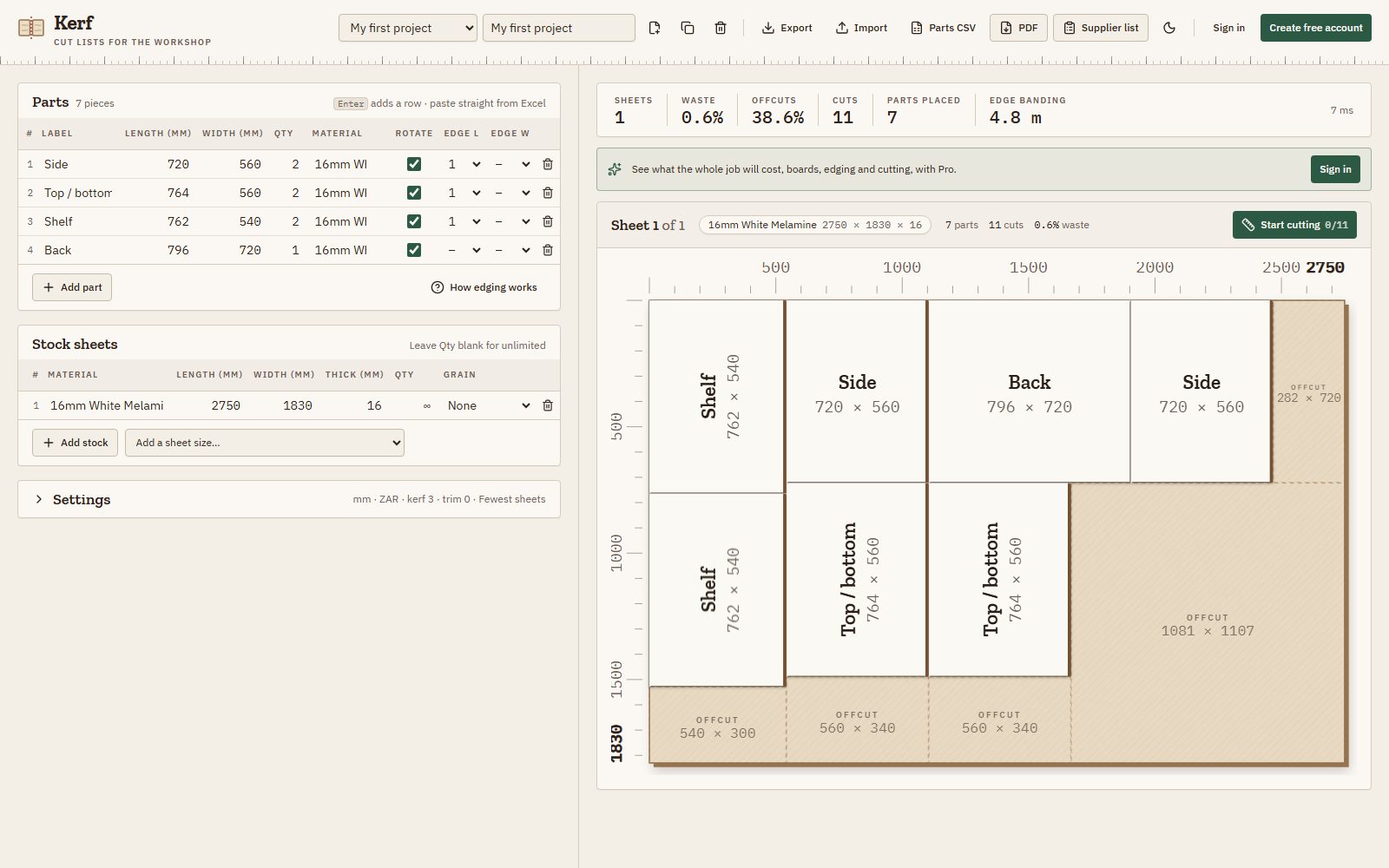
Enter the parts you need and the boards you have. Kerf works out the layout with the least waste, allowing for grain, saw kerf and edge banding, and gives you a cut order for the saw.
No download · No account needed · Works in mm and inches
Features
Everything between the drawing and the saw
Layouts that waste less board
Kerf tries hundreds of arrangements for every material and keeps the one with the fewest sheets and least waste, counting big offcuts as usable stock, not scrap.
Grain, kerf and trim
Set the blade thickness and an edge trim once. Lock the grain on doors and visible panels and Kerf keeps them running the right way.
A cut order for the saw
Every sheet comes with numbered cuts: longest cuts first, and cuts at the same fence setting together, so you set the fence fewer times.
Cutting mode at the saw
Work through a sheet one cut at a time on a tablet or laptop. The next cut is drawn on the sheet, and finished pieces grey out with a tick.
Edge banding totals
Mark the banded sides of each part like a supplier’s list (Edge L, Edge W) and get the metres of edging per board, with an allowance per edge.
Paste from Excel
Paste rows from Excel or Google Sheets, or import a CSV. Kerf finds the header row and maps the columns, so a long parts list takes seconds.
mm or inches
Millimetres, centimetres, decimal or fractional inches. Type 724mm or 28 1/2" in any field. Switching never changes a layout.
Cut lists on paper
A clean PDF: a cover page with the full cut list, materials and edging, then a page per sheet with its layout and cut order.
How it works
From parts list to cut sheets in three steps
- 01
List your parts
Type or paste each part: name, length, width, quantity, material and banded edges.
- 02
Add your boards
Pick a sheet size such as 2750 × 1830 or 2440 × 1220 (8 × 4 ft), or enter your own, and how many you have.
- 03
Cut
Kerf lays out every sheet with a cut order. Print the PDF, send a supplier list, or cut along in cutting mode.
New to cut lists? Read how to make a cut list, step by step.
At the saw
Cut one sheet at a time, without losing your place
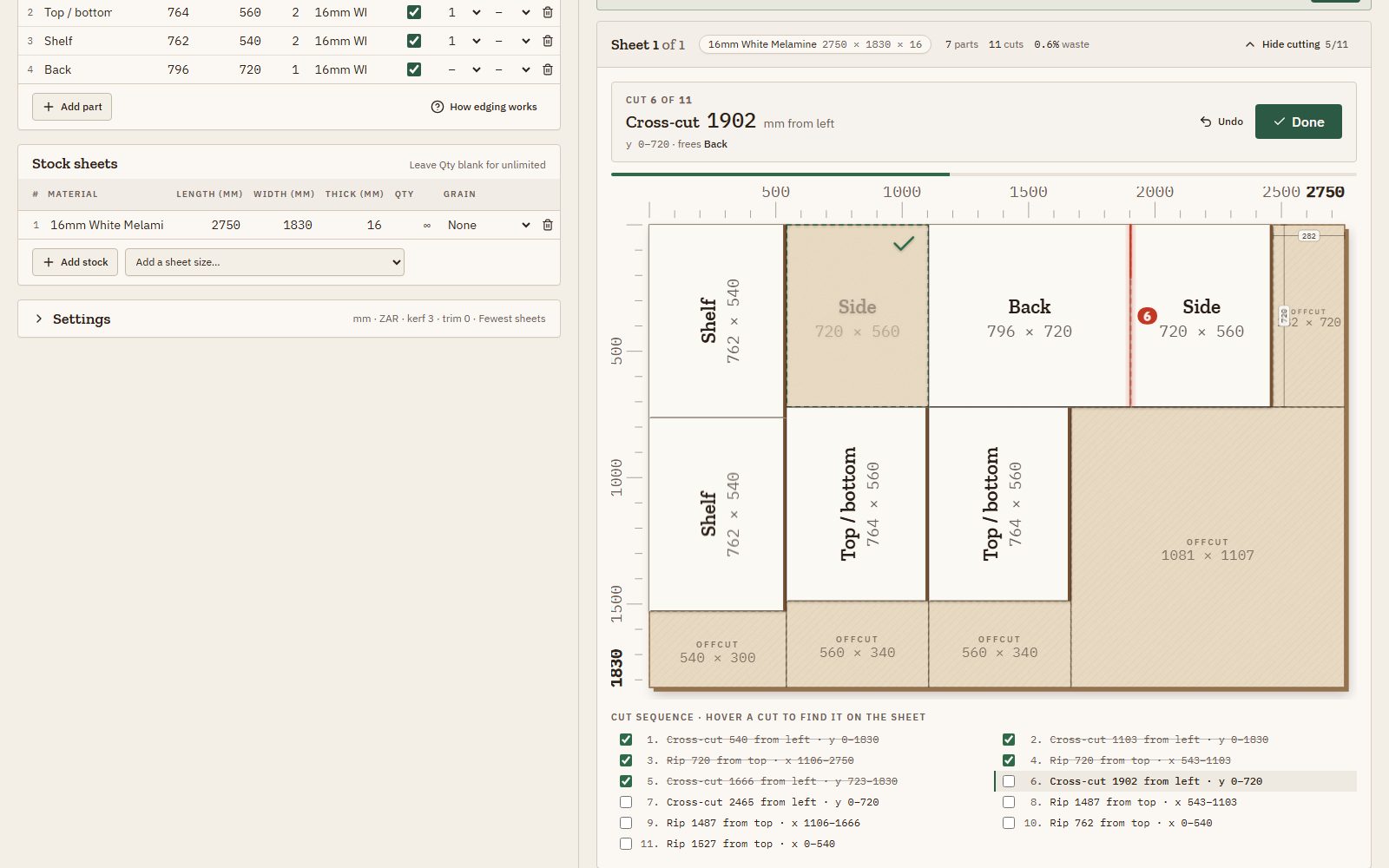
Open Start cutting under any sheet. Kerf shows the next cut on the board with its number and length. Tap Done and the piece that came free greys out, so the next cut is easy to find.
Progress is saved per sheet. Step back with Undo, or jump to any cut in the list. If you change the parts, the sheet starts fresh.
Prefer paper? The PDF has a page per sheet with the layout, the parts on it and the cut sequence. Want strips first? Turn on rips first and each sheet is ripped into full-length strips before any crosscut.
For South African workshops, and everywhere else
Speaks your supplier’s language
Board supplier cutting lists
Pro makes a cutting list in the format SA board suppliers ask for: Length (A) with the grain, Length (B), quantity, Edge L and Edge W, with edging colour and type. Send it in to have your boards cut and edged.
Local sheet sizes
Presets for the boards you actually buy: 2750 × 1830, 2440 × 1220 and 1830 × 915 mm, plus 4 × 8 ft and other North American sizes. See the sheet size guide.
What the job will cost
Pro prices the boards, edging per metre and the supplier’s cutting fee per cut, in rand or your own currency, so you know the cost before you order.
Pricing
Free for cutting. Pro when you order boards.
Free
$0
The optimiser, cutting mode, edge banding totals and PDF preview. Work in your browser, or sync 3 projects with a free account.
Pro
$5 / month
Or $48 a year. PDF download, supplier cutting lists, cost estimates and unlimited synced projects.
Questions
Cut list optimiser FAQ
Is Kerf free?
Yes. The optimiser, cutting mode, edge banding totals and the PDF preview are free, with no time limit. You can work without an account; a free account syncs up to 3 projects. Pro adds PDF download, supplier cutting lists, costing and unlimited synced projects.
Do I need to install anything or sign up?
No. Kerf runs in your browser on Windows, Mac, Linux or a tablet. Open it and start typing parts; your work is saved in the browser as you go. Sign up only if you want your projects on more than one device.
What does a cut list optimiser do?
You enter the parts you need and the boards you have. The optimiser works out how to place the parts on as few boards as possible with the least waste, allowing for the saw blade, trimmed edges and grain direction, and gives you a layout and cut order for every sheet.
Does Kerf allow for the saw blade (kerf) and grain direction?
Yes. You set the blade thickness (kerf) and an edge trim, and every layout allows for both. Untick Rotate on a part whose grain matters and it keeps to the grain of the board.
Will the layouts work on a panel saw or table saw?
Every layout uses guillotine cuts: each cut goes right across the piece being cut, the way panel saws, track saws and table saws work. A rips-first option cuts full-length strips first, which is easier at the saw.
Can I paste my parts from Excel or another program?
Yes. Copy rows from Excel or Google Sheets and paste them into the parts table, or import a CSV file, for example a parts list exported from your design software. Kerf recognises a header row and maps the columns.
Does it work in inches?
Yes. Switch between millimetres, centimetres, decimal inches and fractional inches (to 1/16"). Any size field also accepts another unit, like 28 1/2" or 724mm. Board presets include South African and North American sheet sizes.
Can I send the cutting list to my board supplier?
With Pro, Kerf makes a supplier cutting list in the format South African board suppliers use: Length (A) with the grain, Length (B), quantity, and Edge L / Edge W for the banded sides, ready to send for cutting and edging.
Your next job, laid out in a minute
A sample cabinet project is loaded when you open Kerf, so you can see a layout before typing anything.
Open the cut list optimiser